 TechBlonhub A new digital technology era.
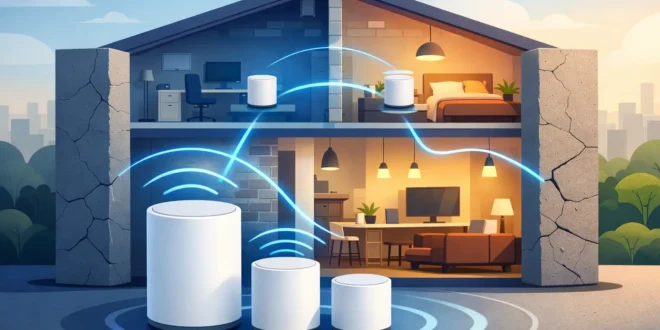

A mesh kit can look impressive on the box and still fail in a 1920s brick house, a concrete apartment, or a small office divided by plaster-and-lath walls. The real challenge with mesh wifi for thick walls is not buying more nodes. It is getting a usable signal between nodes without sacrificing the speed your phones, laptops, cameras, and work systems need.
That distinction matters. A mesh system only improves coverage when its satellite units can communicate effectively with the main router. Put a node behind two dense walls with a weak connection, and it may spread slow Wi-Fi farther rather than fix the dead zone. The right plan starts with the building, then matches the hardware and placement to it.
Why Thick Walls Break Wi-Fi So Easily
Wi-Fi uses radio signals, and dense building materials absorb or reflect those signals. Drywall causes some loss, but old brick, concrete, stone, tile, metal framing, mirrors, radiant heating, and plaster with wire mesh can cause far more. A signal that reaches across an open-plan home at high speed may struggle to cross one exterior brick wall.
The frequency band also changes the outcome. The 2.4 GHz band travels farther and passes through walls better, but it has less capacity and is more vulnerable to interference from neighboring networks, Bluetooth devices, and smart-home equipment. The 5 GHz band delivers higher speeds but loses strength more quickly through dense materials. The newer 6 GHz band can be excellent for clean, high-capacity connections in the same room or nearby rooms, yet it generally has the shortest practical range through walls.
This is why a high-end Wi-Fi 7 mesh system is not automatically the best answer for a thick-walled property. It offers more capacity and better features, but physics still applies. If the nodes cannot maintain a strong backhaul connection, expensive hardware will not create a reliable network by itself.
Start With a Coverage Plan, Not a Node Count
Before purchasing equipment, identify where the internet enters the building, where people actually work or stream, and which rooms have repeat problems. A basic floor plan helps. Mark the modem or fiber gateway, the main router location, thick interior walls, exterior masonry, stairwells, and dead zones.
The best location for the primary mesh router is usually as central and open as possible, not hidden in a basement cabinet or placed at one far end of the property. If the provider’s connection arrives in an inconvenient corner, running one Ethernet cable to a better router location can make a larger difference than upgrading to a more expensive mesh system.
Place the first satellite where it still gets a strong connection from the main node, not inside the dead zone. This is the placement mistake that causes most disappointing mesh installations. Think of each satellite as a relay point. It needs a healthy signal coming in before it can provide a healthy signal going out.
In many older homes, a satellite placed in a hallway, landing, or room just before a dense wall works better than one placed deep inside the farthest bedroom. For multi-floor properties, position nodes vertically where possible. An upstairs node directly above or below the main router may perform better than one separated by several brick walls on the same level.
Test Before You Permanently Install
Do not mount nodes immediately. Set them on shelves or tables first, then test signal quality and real-world speed in the rooms that matter. Check a video call, a large download, and a speed test from multiple devices. Move a node a few feet, change its height, and test again.
Small changes can matter. Keep mesh nodes away from large TVs, metal filing cabinets, aquariums, microwave ovens, cordless-phone bases, and enclosed media cabinets. Elevating a node to chest height or higher is often better than putting it on the floor.
Wired Backhaul Is the Best Fix for Thick Walls
For demanding homes and small businesses, wired backhaul is the answer worth prioritizing. Instead of having mesh nodes communicate wirelessly through walls, each node connects by Ethernet to the main network. The nodes still provide one Wi-Fi network and support roaming, but the most difficult part of the connection is handled over cable.
A wired backhaul can turn a frustrating thick-wall installation into a high-performance network. It is especially valuable for remote workers, security cameras, NAS devices, 4K streaming, gaming, VoIP phones, and teams moving large files.
If Ethernet cabling already exists, use it. If not, consider whether a contractor can run Cat6 cable through an attic, basement, crawl space, or existing conduit. For a permanent installation, this is usually a better investment than adding several wireless mesh nodes and hoping they overcome masonry.
MoCA can also be a strong alternative in homes with usable coaxial cable outlets. It carries network traffic over existing coax and can provide a much more stable connection than a wireless hop. Powerline adapters are less predictable because performance depends heavily on the property’s electrical wiring, circuits, and noise. They can help in some situations, but test them before building a network plan around them.
What to Look for in a Mesh System for Thick Walls
When shopping, focus less on advertised square footage and more on the system’s radios, backhaul options, Ethernet ports, and management controls. Coverage claims are usually measured in ideal environments with minimal obstructions. A stone or brick property is not an ideal environment.
A tri-band mesh system is often a better wireless choice than a basic dual-band system. It has an additional radio that can serve as a dedicated or flexible backhaul channel between nodes. That reduces the performance penalty when satellites must communicate wirelessly. It does not defeat concrete or stone, but it can maintain better speeds when node placement is sensible.
Wi-Fi 6 remains a practical value choice for many households and small offices. It handles multiple devices well and is widely supported. Wi-Fi 6E and Wi-Fi 7 add access to the 6 GHz band and higher potential capacity, which can be useful in less obstructed areas or when using wired backhaul. Do not buy solely for the newest standard if your central problem is a dense wall between every room.
Ethernet ports matter. At minimum, look for a system with Gigabit Ethernet ports on every node. Multi-gig ports are worthwhile if you have internet faster than 1 Gbps, a high-speed NAS, or wired backhaul that you want to keep ready for future upgrades. In a small business, managed access points connected to a wired switch may be a stronger option than consumer mesh, especially when you need separate guest, staff, and IoT networks.
When Mesh Is Not the Right Architecture
Mesh is convenient, but convenience is not the same as best performance. A large house with brick interior walls, a converted warehouse, or an office with concrete fire walls may need wired access points instead. Each access point connects by Ethernet and broadcasts Wi-Fi locally, eliminating the weak wireless link between mesh nodes.
This approach also gives IT administrators more control over channel planning, power levels, VLANs, guest access, and security policies. It costs more upfront if cabling is required, but it is easier to scale and troubleshoot than a chain of wireless mesh nodes.
A hybrid design is often the practical middle ground: use a mesh system for simple management, wire the nodes that can be wired, and use one carefully placed wireless satellite only where cable is genuinely impractical. This avoids turning every room into another wireless hop.
Avoid These Common Thick-Wall Wi-Fi Mistakes
Do not place all nodes at the far edges of the building. Do not expect a single node to cover a detached garage through exterior brick. Do not hide the main router in a utility closet. And do not add satellites endlessly without checking the quality of the connection each one receives.
Also watch for daisy-chaining. Some mesh systems allow one satellite to connect through another satellite rather than directly to the main router. This can extend reach, but each wireless hop can add latency and reduce available throughput. It is acceptable for a low-demand corner of a home, but it is a poor design for a home office or camera system.
After installation, update firmware, use WPA3 where compatible, create a separate network for smart devices if available, and turn on automatic security updates. Better coverage should not come at the expense of network protection.
The best mesh Wi-Fi setup for thick walls is usually less about buying the most powerful package and more about reducing what Wi-Fi has to fight through. Put the main node in the right place, wire backhaul wherever possible, and test before you commit. A single well-placed wired node can solve the problem that three extra wireless satellites never will.





