 TechBlonhub A new digital technology era.
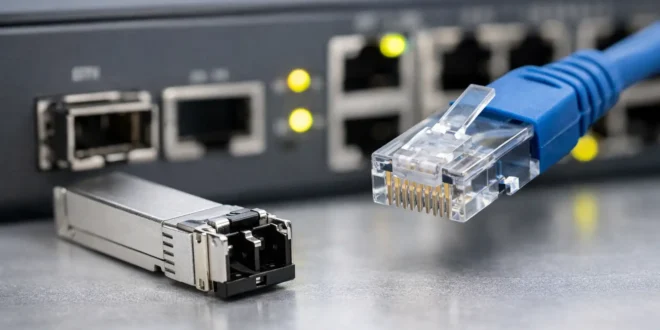

A switch uplink can become the bottleneck that makes an otherwise solid network feel slow. You may have plenty of gigabit ports for users and devices, but if traffic between switches, servers, storage, and the firewall is constrained, performance problems spread quickly. That is why the sfp vs rj45 uplinks decision deserves more attention than a quick look at connector shapes.
RJ45 is familiar, inexpensive, and easy to deploy over existing Ethernet cable. SFP-based uplinks can run fiber, direct-attach copper, or RJ45 transceivers, giving them a much wider range of speed and distance options. Neither is automatically better. The right choice depends on the equipment you own, cable routes, required bandwidth, and how much growth you need to accommodate.
SFP vs RJ45 Uplinks: The Core Difference
An RJ45 uplink is a fixed Ethernet port that uses the same eight-pin connector found on most PCs, routers, access points, and network switches. It commonly supports 1GbE, 2.5GbE, 5GbE, or 10GbE over twisted-pair copper cabling. For a compact office network with structured Cat6 or Cat6a cabling already installed, this is usually the simplest path.
An SFP uplink is a slot rather than a fixed media type. You insert a compatible module or cable assembly into it. A standard SFP slot is generally used for 1GbE, SFP+ for 10GbE, SFP28 for 25GbE, and higher-speed variants exist for enterprise and data center equipment. The slot may accept a fiber optic transceiver, a direct-attach copper cable, or in some cases an RJ45 copper transceiver.
That flexibility is the main advantage of SFP. It lets a switch use short, low-cost DAC cables inside a rack, multimode fiber across an office floor, or single-mode fiber between buildings. But flexibility also introduces compatibility checks, module costs, and more opportunities to make the wrong purchase.
Speed Is Only Part of the Decision
For basic switching, 1GbE RJ45 and 1GbE SFP provide similar real-world throughput. The difference becomes more meaningful at 10GbE and above.
10GBASE-T over RJ45 can deliver 10GbE over Cat6a copper for up to 100 meters. It is useful when you need high speed to servers, NAS units, workstations, or switches through existing copper pathways. Cat6 may also support 10GbE, but typically only up to 55 meters and only under favorable installation conditions. Do not treat that distance as a guarantee in a noisy or poorly installed cable environment.
SFP+ can also provide 10GbE, but the media matters. A passive DAC cable is often a practical choice for links within the same rack or adjacent racks. Fiber handles longer runs without the electrical interference concerns associated with copper. Multimode fiber is common for short-to-medium building links, while single-mode fiber is used for longer campus, metro, and provider-style distances.
For a growing business, another key advantage is the upgrade path. A switch with SFP28 ports can support 25GbE links that are far more practical for storage, virtualization hosts, core switches, and heavy east-west traffic. RJ45 has multigig options, but it is not usually the first choice for 25GbE or faster switch uplinks.
Distance and Interference Change the Equation
Copper RJ45 is excellent when the link stays within a typical office or equipment room. It is easy to terminate, test, patch, and understand. However, copper Ethernet carries electrical signals, which means installation quality and electromagnetic interference can affect reliability.
Fiber is electrically nonconductive and immune to electromagnetic interference. That makes it the better choice near industrial machinery, elevators, electrical rooms, and other high-noise environments. It is also the safer option for connecting separate buildings because it avoids ground-potential differences that can damage copper-connected equipment during electrical events.
There is a practical caveat: fiber requires more care. Connectors must be kept clean, cable bend limits matter, and the transceiver type must match the fiber type at both ends. A mismatched multimode and single-mode setup will not work simply because both modules fit an SFP slot.
Cost: Look Beyond the Switch Price
RJ45 usually wins the initial-cost argument when a site already has usable structured cabling. A switch with built-in RJ45 uplinks avoids separate optical modules, and common patch cables are inexpensive. Your IT team can also keep spare cables on hand without maintaining an inventory of transceiver models.
SFP can be inexpensive for short rack connections. Passive DAC cables are often cost-effective and use little power. Fiber patch cables themselves are affordable, but the optics on each end add to the total. Once you include transceivers, fiber panels, patching, installation labor, and spares, a fiber deployment may cost more upfront.
The calculation shifts if a copper run would require new cable routes, repeaters, or troubleshooting time. Pulling fiber once can be a smarter long-term investment, especially when the route serves a core switch, server room, or separate building. Fiber also gives you more headroom for future upgrades without replacing the physical cable plant.
Power and Heat Matter in Dense Switches
RJ45 10GBASE-T ports and RJ45 SFP+ modules generally consume more power and generate more heat than SFP+ fiber or passive DAC connections. That may not matter for one uplink in a small network closet. It matters a great deal when a 48-port switch is using many 10GbE copper connections or when cooling is already marginal.
A 10G RJ45 transceiver plugged into an SFP+ port can be especially demanding. Some switches limit support for these modules, restrict the port speed, or warn against using several of them at once. Always check the switch vendor’s compatibility list and thermal guidance before assuming an SFP+ slot can become a 10GbE RJ45 port at scale.
For power-sensitive deployments, passive DAC is hard to beat at short distances. It has no optical components and typically creates less heat than 10GBASE-T. The trade-off is reach and flexibility: DAC cables are short and are often vendor-coded, so they are best suited to predictable rack layouts.
When RJ45 Uplinks Make Sense
Choose RJ45 uplinks when you already have quality copper cabling, your uplink distances remain within Ethernet limits, and straightforward installation is the priority. They are a strong fit for small offices, retail sites, classrooms, and branch locations where a switch connects to a router, firewall, or another nearby switch.
RJ45 is also practical for multigig networks. If your wireless access points have 2.5GbE ports and your switch supports 2.5GbE or 5GbE uplinks, copper can prevent Wi-Fi traffic from being squeezed through a 1GbE connection without forcing a fiber redesign.
When SFP Uplinks Are the Better Move
Choose SFP uplinks when distance, interference resistance, high speed, or future expansion matters more than the lowest initial cost. Fiber is the clear choice for inter-building links and often the most sensible choice for backbone runs across larger offices, warehouses, and campuses.
SFP is also the better fit for server racks and network cores. A short SFP+ DAC link between a core switch and a virtualization host can provide 10GbE efficiently, while fiber supports longer runs to storage or distribution switches. If you expect to move beyond 10GbE, buying switches with SFP28 or higher-speed uplinks can protect your next upgrade cycle.
Compatibility Checks Before You Buy
The connector is not the whole story. Before ordering modules or cables, confirm the switch port speed, supported transceiver types, vendor coding policy, and firmware version. An SFP module is not interchangeable with SFP+, and an SFP+ module will not magically create a 25GbE link in an SFP28 environment.
Also verify the capabilities at both ends. A 10GbE SFP+ uplink connected to a 1GbE SFP port may not negotiate down unless both devices explicitly support that mode. Fiber modules must match by speed, wavelength, connector type, and fiber type. For DAC links, cable length and vendor compatibility deserve the same attention.
Do not overlook redundancy. If the uplink carries critical traffic, two links using link aggregation or a redundant network design may offer more value than spending the full budget on one faster connection. This depends on whether your switches, firewall, and network architecture support redundant paths correctly.
The best uplink is the one that removes today’s bottleneck without trapping your network in tomorrow’s cabling limits. Measure the actual route, map the traffic that crosses it, and choose the media you can support confidently when a link fails at an inconvenient hour.





