 TechBlonhub A new digital technology era.
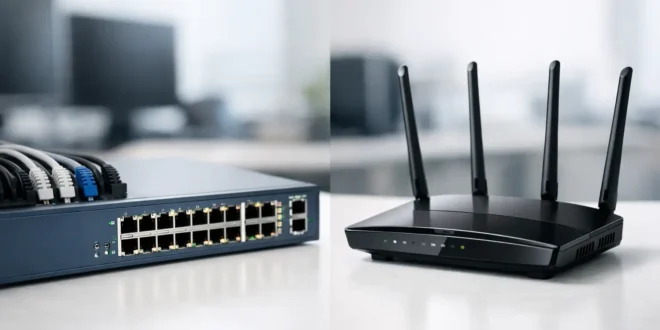

A slow office network is not always an internet problem. It may be a traffic-control problem inside the building. In a managed switch vs router decision, the right answer is rarely one device replacing the other. They perform different jobs, and confusing those jobs can lead to weak security, unreliable Wi-Fi, and expensive hardware that does not solve the real issue.
A router connects different networks and decides where traffic goes. A managed switch connects devices on the same local network and gives IT teams fine-grained control over how that traffic behaves. Most small businesses, labs, and serious home networks need both.
Managed Switch vs Router: The Core Difference
Think of a router as the network’s border controller. It usually sits between your local network and the internet service provider. It assigns or coordinates IP addressing, routes traffic between subnets, applies firewall rules, and often provides services such as VPN access, port forwarding, and network address translation (NAT).
A managed switch is the traffic organizer inside your network. It connects wired PCs, servers, access points, cameras, printers, and other Ethernet devices. Unlike an unmanaged switch, it lets an administrator configure ports, create virtual LANs (VLANs), prioritize critical traffic, monitor usage, and apply access controls.
The distinction matters because a managed switch generally does not replace an internet gateway. Likewise, even an excellent router cannot provide enough wired ports or the detailed LAN segmentation many organizations need.
| Device | Primary job | Best use | | — | — | — | | Router | Connects and routes between networks | Internet access, firewalling, VPNs, subnet routing | | Managed switch | Connects and controls local wired devices | VLANs, PoE devices, port management, traffic monitoring | | Unmanaged switch | Adds basic Ethernet ports | Small, simple networks with no segmentation needs |
What a Router Actually Does
A router examines IP addresses and forwards data toward another network. For a typical office, that means sending employee traffic to the internet and returning responses to the correct device. It also separates your private LAN from the public internet, which is why its security role is so important.
Most business-grade routers or firewalls can create multiple subnets. For example, you might use one network for staff, another for guests, and a third for security cameras. The router can then enforce rules between them. Guests can reach the internet, but not the accounting server. Cameras can talk to a recorder, but cannot browse the web.
Router performance is often measured by WAN throughput, firewall throughput, VPN throughput, and the number of concurrent sessions it can handle. A low-cost router may look fast on its Wi-Fi box label but struggle once intrusion prevention, VPN users, or gigabit internet service are involved.
Consumer routers commonly combine routing, Wi-Fi, and a small four-port switch in one unit. That is convenient for a home or very small office. It becomes limiting when you need 12 wired devices, power over Ethernet (PoE) for access points and cameras, or separate policies for different groups of users.
Why Choose a Managed Switch?
A managed switch is worth the extra cost when uptime, security, or visibility matters. It allows you to control the local network rather than treating every connected device as equally trusted.
VLANs are the headline feature. A VLAN logically separates devices even when they use the same physical switch. You can place HR laptops on one VLAN, guest access points on another, and smart building devices on a third. Those groups remain isolated until a router or Layer 3 switch is configured to route traffic between them.
This setup is especially valuable for devices that are difficult to secure. A smart TV in a conference room, an IP camera, or an internet-connected door controller should not have the same access as a managed workstation. Segmentation limits the damage if one device is compromised.
Managed switches also offer practical operational tools:
- PoE or PoE+ can power access points, VoIP phones, and cameras through the same Ethernet cable that carries data.
- Quality of Service (QoS) can prioritize voice and video traffic when a busy network causes call quality problems.
- Port monitoring and statistics help identify a saturated uplink, a misbehaving device, or unexpected traffic.
- Link aggregation combines compatible Ethernet links for higher capacity or redundancy between switches, servers, or storage.
- Port security and access controls can limit what connects to a port and reduce the risk of rogue devices.
Not every managed switch includes every feature at the same quality level. Before buying, check its PoE power budget, uplink speed, switching capacity, VLAN limits, fan noise, cloud-management requirements, and support for standards your equipment needs.
Layer 2 vs Layer 3 Managed Switches
This is where the managed switch vs router question gets more nuanced. Most managed switches are Layer 2 devices. They forward traffic based on MAC addresses and handle VLANs, but they rely on a router or firewall to move traffic between VLANs.
A Layer 3 managed switch can route between VLANs itself. In a larger office, this can reduce bottlenecks because local inter-VLAN traffic does not have to travel to the router and back. A Layer 3 switch is useful when many users, servers, and devices communicate internally at high speed.
However, Layer 3 switching is not a complete router replacement for most organizations. It may support static routes and fast local routing, but it often lacks the mature firewall inspection, VPN features, WAN failover, content filtering, and internet-edge security found in a dedicated router or next-generation firewall.
A practical design is to use the Layer 3 switch for high-speed internal routing and the firewall/router for internet access and security policy. Smaller networks can keep things simpler: let the router handle inter-VLAN routing and use a Layer 2 managed switch for device connectivity.
When You Need One, the Other, or Both
If you only need to connect a few wired devices to one flat network, a basic router or an unmanaged switch may be enough. A student apartment, a small home office, or a temporary setup does not automatically need VLANs and enterprise controls.
Choose a router first when your priority is connecting to the internet securely, replacing an underpowered ISP gateway, supporting remote workers through VPN, or creating basic network separation. If your internet connection is slow because the existing router cannot keep up, buying a managed switch will not fix it.
Choose a managed switch when you need more Ethernet ports, PoE, VLANs, monitoring, or reliable control over wired traffic. It is often the right upgrade for an office adding access points, desk phones, surveillance cameras, and dedicated workstations.
Choose both when your network has multiple device types and any meaningful security requirement. A 20-person business with cloud applications, guest Wi-Fi, cameras, and VoIP should not place every device on one shared network just because it is easier on day one. The same principle applies to home labs and power users with servers, network-attached storage, and smart devices.
A Real-World Setup That Makes Sense
Consider a small business with 15 employees, two Wi-Fi access points, eight IP cameras, VoIP phones, and a file server. The router or firewall sits at the internet edge, handles the ISP connection, blocks unwanted inbound traffic, and provides VPN access for approved remote staff.
A PoE managed switch connects the access points, cameras, phones, computers, and server. VLANs separate employee devices, guest Wi-Fi, voice traffic, cameras, and servers. The router enforces rules between those VLANs: guests get internet only, cameras can reach the network video recorder, and staff can access the file server based on business needs.
That design costs more than plugging everything into an all-in-one Wi-Fi router. It also makes troubleshooting easier, protects sensitive systems, and creates room to grow without rebuilding the network.
Buying Mistakes to Avoid
Do not buy a managed switch solely because it has a large port count. First calculate how many devices you have now, then leave room for growth. Include access points, printers, cameras, phones, uplinks, and any spare ports needed for temporary equipment.
Do not overlook speed. Gigabit Ethernet remains sufficient for many endpoint connections, but 2.5GbE can make sense for newer Wi-Fi access points, workstations, and NAS devices. For a switch serving several high-speed devices, 10GbE uplinks prevent all that traffic from being squeezed through a single gigabit connection.
Also, do not treat VLANs as security by themselves. VLANs create separation, but the router or firewall rules determine what is allowed between those segments. A poorly configured “allow any” rule can erase the security benefit immediately.
Finally, factor in management overhead. A managed switch is most useful when someone is willing to document VLANs, save configurations, apply firmware updates, and review alerts. For a tiny network with no such need, an unmanaged switch may be the better value.
The best network is not the one with the most features. It is the one where each device has a clear job: let the router protect and direct traffic, let the managed switch organize the LAN, and leave enough capacity for the next problem your network will have to solve.





