 TechBlonhub A new digital technology era.
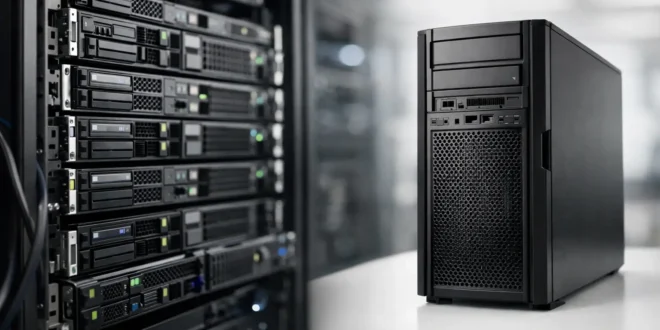

A server purchase can look simple until the hardware arrives and exposes a problem nobody budgeted for: no rack space, too much fan noise, poor cooling, or an upgrade path that runs out far too soon. The rack server vs tower server decision affects far more than the shape of the chassis. It determines where the system lives, how easily it grows, how your team services it, and how much infrastructure you need around it.
For a small office deploying its first file server or virtualization host, a tower can be the smart, low-friction choice. For an IT team building a denser environment with multiple servers, switches, and storage appliances, rack-mounted hardware is usually the better long-term move. The right answer depends on workload, room conditions, growth expectations, and the total cost beyond the server itself.
Rack server vs tower server at a glance
A rack server is designed to mount horizontally in a standardized 19-inch equipment rack. Its height is measured in rack units, or U. A 1U server is 1.75 inches tall, while 2U and 4U models provide progressively more room for drives, expansion cards, and cooling.
A tower server stands upright like a desktop PC, although business-class models use server-grade processors, memory, storage controllers, and remote-management tools. It can sit in an office, a storage room, or under a desk if airflow and noise are acceptable.
The biggest distinction is density. Rack servers let an organization place many systems in one controlled location. Tower servers prioritize standalone deployment, lower initial setup costs, and quieter operation in less formal IT environments.
| Factor | Rack server | Tower server | |—|—|—| | Best fit | Server rooms, data closets, growing IT estates | Small offices, branch sites, home labs | | Space use | High density in a rack | Uses floor or desk space | | Noise | Often loud under load | Usually quieter, especially larger chassis | | Cooling | Needs planned rack and room airflow | More forgiving in a typical office | | Expansion | Excellent across multiple rack devices | Strong within one chassis, limited physical density | | Upfront setup | May require rack, UPS, PDU, and cooling work | Can often operate with minimal extra hardware |
When a rack server is the better choice
Rack servers make sense when infrastructure needs to be centralized and managed as a system rather than as a collection of individual machines. If you already have a network rack with a firewall, switch, patch panel, and UPS, adding a rack server keeps cabling, power, and monitoring in one place.
They are particularly effective for virtualization. A 2U rack server can support substantial CPU core counts, large memory configurations, fast NVMe storage, multiple network adapters, and redundant power supplies. That matters when one physical host runs many virtual machines for line-of-business apps, domain services, databases, backups, or development environments.
Rack hardware also scales cleanly. Instead of finding another corner of the office for each new server, an IT team can add systems vertically in available rack units. Standard rails make servicing easier, and front-to-back airflow is predictable when equipment is installed correctly.
There is a trade-off: compact rack chassis often use small, high-speed fans. A 1U server can be extremely loud, especially during startup or heavy workloads. That is normal in a server room and disruptive in an open office. Rack servers also concentrate heat, so a closet with limited ventilation can become a reliability problem quickly.
When a tower server is the smarter purchase
A tower server is often the practical winner for a business with one or two critical workloads and no dedicated server room. It requires less supporting equipment, produces less noise than many rack models, and is easier to place in a secure office or utility area.
The larger chassis can also offer useful internal expansion. Depending on the model, a tower may hold several large-capacity hard drives, full-height PCIe cards, and more easily accessible components than a shallow rack chassis. This is valuable for local file storage, video recording, backup targets, and small virtualization deployments.
Tower servers are not merely entry-level machines. Many support enterprise processors, ECC memory, RAID controllers, redundant power supplies, and remote administration. A well-configured tower can run a small company’s core services for years.
The limitation appears when your environment grows. Two tower servers may be manageable. Six towers, each with its own cables and power requirements, create clutter and complicate troubleshooting. Once a business needs dedicated switching, battery backup, shared storage, or several compute hosts, a rack starts to make more operational sense.
Compare the costs beyond the server price
The least expensive server is not always the lowest-cost deployment. A tower may cost less to install because it can use a standard office location and existing power. A rack server may require rails, a cabinet or open-frame rack, a rackmount UPS, power distribution units, cable management, and better cooling.
That initial premium can be worth it when downtime is costly. A properly organized rack helps teams trace cables, replace failed parts, document assets, and separate production equipment from everyday office activity. Physical security also improves when hardware is placed in a locked rack or controlled server room.
Noise and electricity deserve attention as well. Rack servers can use more fan power, particularly dense 1U models. They may also encourage overbuying: a business sees a high-end platform and adds capacity it will not use. Size the server around real requirements such as active users, virtual machines, storage growth, backup windows, and network throughput.
Questions that should drive your decision
Start with location. If the only available space is near employees, a tower server or a quiet 4U rack system is safer than a loud 1U unit. If you have a ventilated network closet with a rack already installed, a rack server is the natural fit.
Next, consider growth over the next three to five years. A small accounting office running file sharing, printing, and a backup application may be fine with one tower. A company planning multiple virtual machines, camera recording, internal applications, or a hybrid on-premises and cloud setup should plan for rack capacity early.
Then look at operational needs. Will someone need to swap drives frequently? Is remote management essential? Do you require redundant power supplies? Are you running 10GbE or faster networking? These questions matter more than whether the server looks like a desktop or a flat appliance.
Security is another deciding factor. A server placed under a desk is exposed to accidental unplugging, unauthorized access, dust, and spills. A locked rack improves physical control, although it does not replace backups, access policies, firmware updates, or network segmentation.
Common workloads and the best form factor
For a small business file server, local backup target, or a single application server, a tower is usually enough. It offers straightforward deployment and can be configured with plenty of hard-drive capacity without forcing the business to build a dedicated rack environment.
For virtualized workloads, database systems, managed security tools, and multi-user applications, a 2U rack server is often the sweet spot. It provides more expansion room and cooling headroom than 1U while keeping the environment compact. It also pairs naturally with rack switches, firewalls, and UPS equipment.
Video surveillance deserves a closer look. A small camera deployment can run on a tower-based network video recorder with large internal drives. Larger installations with many high-resolution cameras, long retention requirements, and multiple recording servers benefit from a rack design that supports dense storage and organized network cabling.
Home lab users can choose either. A used rack server offers serious compute density and enterprise features, but power draw and fan noise can be painful in an apartment or shared home. A tower server is generally easier to live with, especially when testing containers, virtual machines, storage, or network services after hours.
Avoid these purchasing mistakes
Do not buy a rack server simply because it looks more professional. Without a suitable rack, adequate cooling, and an isolated location, it may create more problems than it solves. Likewise, do not choose a tower only because it is cheaper if you already know the environment will soon need multiple servers and network appliances.
Also avoid treating storage capacity as the only specification that matters. Processor performance, RAM, RAID design, network speed, power redundancy, warranty coverage, and management features all shape the user experience. A server that cannot be monitored or repaired quickly becomes expensive when a failure interrupts the business.
Choose the chassis that fits the room and the roadmap, then configure the hardware for the workloads you actually run. That approach keeps today’s deployment practical while leaving enough room for tomorrow’s problems.





